> ## Documentation Index
> Fetch the complete documentation index at: https://docs.grain.inc/llms.txt
> Use this file to discover all available pages before exploring further.
# Filtering and Searching
> Find specific transactions using filters, search, and CSV export
### Filtering Transactions
The left sidebar provides a set of filters to help you narrow down your transaction list. Use these filters to quickly find transactions by their current status or isolate activity within a specific time period.
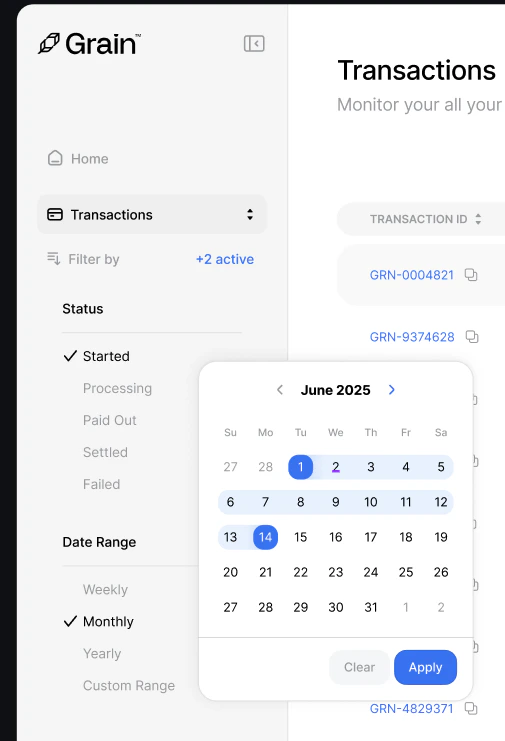 **Status filters** let you isolate transactions by their current state:
* **Started** — Payment session has been created
* **Processing** — Payment is being confirmed on-chain
* **Paid Out** — Funds have been settled to your account
* **Settled** — Transaction is fully complete
* **Failed** — Payment did not succeed
**Date Range** options let you scope transactions by time period:
* **Weekly** — View the last 7 days
* **Monthly** — View the last 30 days
* **Yearly** — View the last 12 months
* **Custom Range** — Pick specific start and end dates using the calendar picker
### Searching and Exporting
The search bar at the top right lets you instantly find specific transactions by **Transaction ID**, **Wallet Address**, or **Booking Reference**.
**Status filters** let you isolate transactions by their current state:
* **Started** — Payment session has been created
* **Processing** — Payment is being confirmed on-chain
* **Paid Out** — Funds have been settled to your account
* **Settled** — Transaction is fully complete
* **Failed** — Payment did not succeed
**Date Range** options let you scope transactions by time period:
* **Weekly** — View the last 7 days
* **Monthly** — View the last 30 days
* **Yearly** — View the last 12 months
* **Custom Range** — Pick specific start and end dates using the calendar picker
### Searching and Exporting
The search bar at the top right lets you instantly find specific transactions by **Transaction ID**, **Wallet Address**, or **Booking Reference**.
 Click **Export CSV** to download your filtered transaction data for accounting, reconciliation, or reporting.